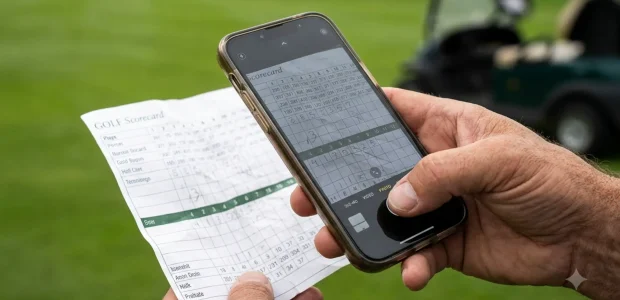

The best golf app that scans handwritten scorecards is SnapCard for foursomes and weekend games, while Scorecard AI provides the fastest standalone scanner for solo players seeking instant Stableford and gross calculations without creating an account.
How AI Scorecard Scanning Works on Physical Paper
AI scorecard scanning converts physical pencil marks into structured digital scoring data by pairing optical character recognition with specialized golf scorecard layouts. Standard document scanners fail on golf cards because generic models expect linear sentences and uniform typography. Golf scorecards, by contrast, present a dense grid of tiny rectangular cells, faint graphite markings, and varied course metadata that requires spatial coordinate parsing.
The digitizing pipeline relies on a sequence of computer vision operations designed to handle messy golf course conditions:
- Image Capture and Corner Detection: When you photograph the card, edge-detection algorithms locate the four corners of the cardstock. This step corrects perspective distortion, tilt, and paper warping caused by taking photos on cart seats or bar tables.
- Grid Matrix Alignment: The software maps the card layout against recognized golf course templates. The vision engine identifies printed reference rows, separating hole numbers, tee yardages, par values, and stroke handicap indexes from the empty cells reserved for player names and scores.
- Handwritten Digit Extraction: Multimodal vision models and convolutional neural networks analyze the graphite marks inside each box. Specialized engines differentiate deliberate numbers from accidental smudges, water spots, or erased scores.
- Mathematical Reconciliation: The application calculates running totals for each player across the Out nine, the In nine, and total gross strokes. It cross-checks these computed sums against any handwritten totals the golfer wrote in the summary columns, flagging discrepancies for review before saving.
The primary technical trade-off in scorecard computer vision centers on speed versus verification rigor. On-device optical character recognition delivers results in under five seconds, but unusual handwriting can trigger misreads. Cloud-based multimodal vision models offer superior handwriting recognition across faint pencil scripts, but require cellular data reception to upload images.
A common mistake among golfers is attempting to digitize cards under direct sunlight. Strong midday sun causes graphite pencil marks to reflect bright glare into the camera lens, washing out pencil lines against white cardstock. Diffused shade under a cart canopy or clubhouse roof produces the contrast required for high optical character recognition accuracy.
The 5 Best Apps for Scanning Handwritten Scorecards
Five dedicated mobile applications lead the golf scorecard digitizing category as of September 2026, separated by algorithm speed, team wagering support, official handicap syncing, and platform availability.
SnapCard
SnapCard is an iOS application built specifically for golfers who prefer using paper scorecards on the course and want instant group settlements when the round finishes. Instead of forcing players to tap their phones after every green, SnapCard lets golfers play analog and digitize their card at the nineteenth hole in under five seconds.
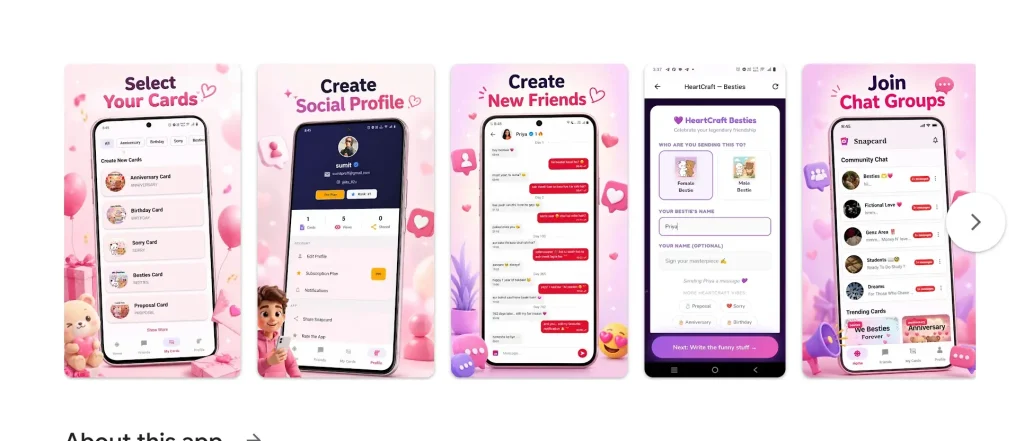
The scanning engine handles nine-hole and eighteen-hole cards, reading multiple player rows from one photo. SnapCard includes an automated settlement engine computing Nassau front, back, and total bets alongside Skins and net stroke play. Payouts reconcile to the cent, eliminating post-round math disputes. It also generates a proprietary BirdieBank performance rating across your last twenty rounds without requiring a golf club membership.
Pricing for SnapCard Pro sits at $4.99 per month or $39.99 per year as of September 2026, with the free download granting access to scan your last five rounds. The notable boundary is platform exclusivity: SnapCard is restricted to Apple devices running iOS. For players seeking an on-course GPS rangefinder, SnapCard will not fit your needs, as it deliberately omits live course mapping to keep your phone tucked away in your bag.
Scorecard AI
Scorecard AI offers fast post-round score conversion for solo players on iOS who want instant analytics without registration friction. You can download the application from the App Store and immediately scan a physical scorecard without creating an account or entering personal contact details.
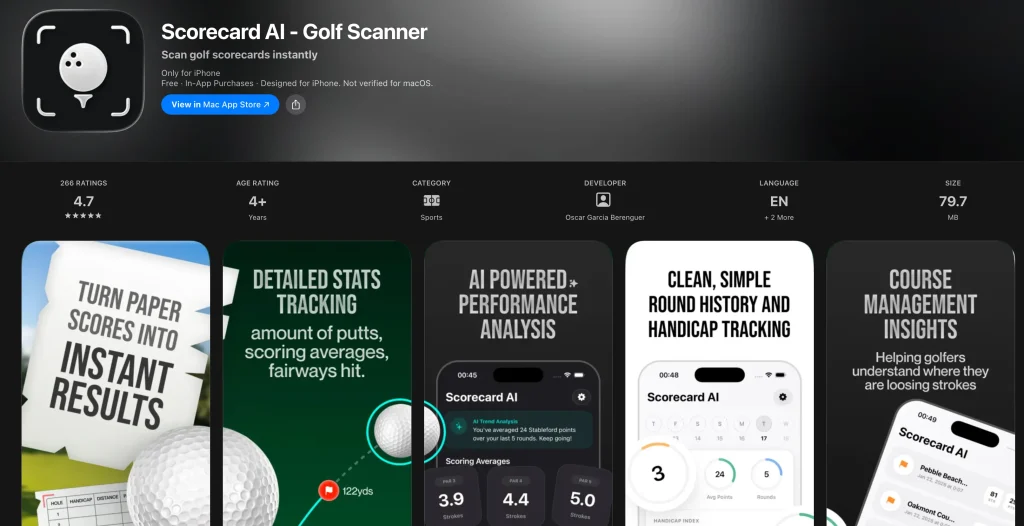
The engine isolates course handicap indexes, hole pars, and handwritten strokes to compute automatic Stableford points alongside gross totals. This makes the app popular across the United Kingdom, Ireland, and continental Europe, where Stableford competitions represent a primary playing format. A dark charcoal interface provides high contrast for reviewing scoring trends and historical score distributions across your regular home courses.
Scorecard AI operates on a freemium model. The free tier lets golfers test scorecard reading, while Pro access costs $6.99 per month, $7.99 per week, or $59.99 annually as of September 2026. Golfers should avoid the weekly subscription tier because two weeks of access costs more than a full monthly plan. While individual statistical tracking is polished, the app does not offer multi-player wager calculation or social team sharing features.
Buddies on the Green
Buddies on the Green brings advanced multimodal vision artificial intelligence to scorecard scanning on both iOS and Android. Built on top of Google Gemini Vision, the app scans up to six player rows simultaneously from a single photograph, making it effective for large groups and multi-foursome outings.
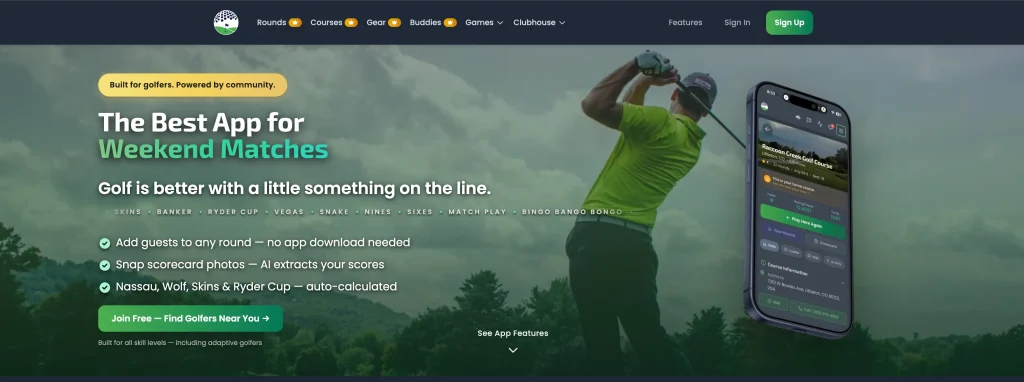
The defining technical feature of Buddies on the Green is its dual-layer verification protocol. The algorithm cross-checks individual hole extractions against written Out, In, and Total scores. If a digit presents ambiguity, such as distinguishing a closed loop four from an open six, the system flags the cell with an amber confidence warning so the player can verify the number prior to database storage. The mobile app automatically compresses photo files prior to transmission, ensuring swift uploads even on weak golf course cellular connections.
Scorecard scanning is integrated into the Buddies on the Green Premium subscription, which costs $2.99 per month or $24.99 per year as of September 2026. The practical trade-off is its dependence on cloud processing: because the vision engine runs through remote servers rather than local device hardware, scanning requires an active internet connection. If your course sits in a cellular dead zone, scans must wait until you connect to clubhouse Wi-Fi.
TheGrint (Scorecard Picture Service)
TheGrint is an established golf platform that provides scorecard digitizing through its proprietary Scorecard Picture Service, known as SPS. Unlike automated computer vision apps that process cards purely through algorithms, TheGrint uses a hybrid workflow pairing optical recognition with human data verification teams.
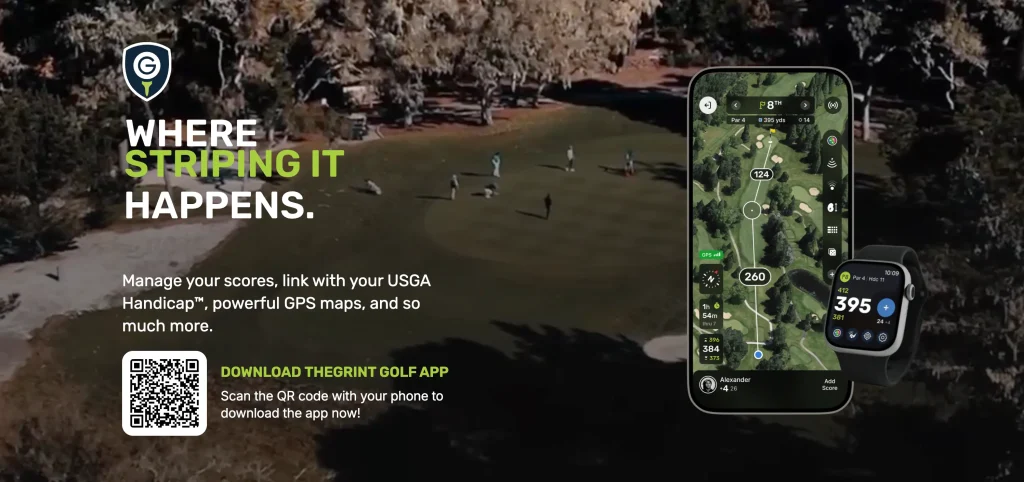
To use SPS, you photograph your paper scorecard through the app at the conclusion of your round. The system transcribes hole-by-hole scores, putts, fairways hit, and penalties into your profile. The principal advantage of this approach is compliance with the World Handicap System. Scores submitted through TheGrint link directly to official USGA handicap indexes, providing certified tracking that amateur tournament players require.
The Scorecard Picture Service is bundled into TheGrint Pro membership, priced between $39.99 and $49.99 annually as of September 2026. The major operational compromise is processing time. Because human reviewers audit ambiguous numbers, transcriptions are not instantaneous; turnaround windows typically range from ten minutes to two hours depending on weekend round volume across international time zones.
Scorecard Snap
Scorecard Snap is a streamlined iOS scoring utility developed by Nicholas Prondzinski. Designed for players who find modern GPS golf applications cluttered and battery-draining, Scorecard Snap acts as a pure photographic gateway to personal golf performance data.
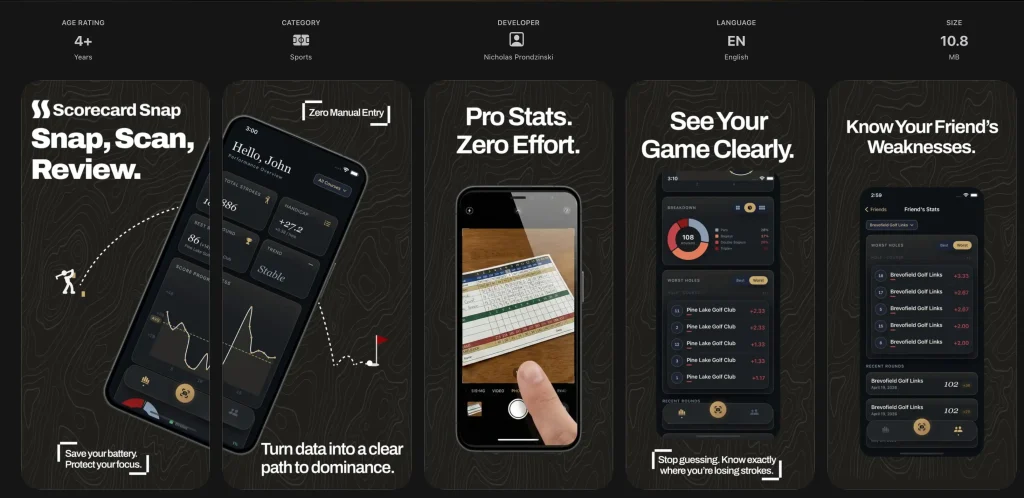
The application takes a photograph of any standard paper card, extracts the stroke data, and organizes it into a permanent performance history. It analyzes course-specific scoring patterns, showing players where they consistently drop shots on specific holes over time. With an app package size of less than 11 megabytes, it consumes minimal device storage and functions smoothly without background location tracking.
Scorecard Snap is free to download on iOS, with Pro subscriptions priced at $12.99 per month or $69.99 per year as of September 2026. The annual price point sits higher than competitors like SnapCard and Buddies on the Green, despite offering fewer multiplayer wager features. It suits dedicated solo golfers who value minimalist software architecture and zero on-course phone usage.
Feature and Pricing Comparison Side by Side
Comparing scorecard scanner applications reveals clear distinctions in processing turnaround, group capacity, handicap compliance, and recurring subscription costs.
| Application | Operating System | Scan Speed | Max Players | Handicap Integration | Annual Price (September 2026) |
|---|---|---|---|---|---|
| SnapCard | iOS | Under 5 seconds | 4 players | Proprietary BirdieBank | $39.99 / year |
| Scorecard AI | iOS | Under 10 seconds | 1 player | Stableford points | $59.99 / year |
| Buddies on the Green | iOS, Android | Under 10 seconds | 6 players | Gross / Net tracking | $24.99 / year |
| TheGrint (SPS) | iOS, Android | 10 to 120 minutes | 4 players | Official USGA / WHS | $39.99 to $49.99 / year |
| Scorecard Snap | iOS | Under 10 seconds | 4 players | Internal handicap trend | $69.99 / year |
A critical hidden condition to watch across automated scorecard scanners is how free tiers are structured. Scanning paper cards requires ongoing server computational resources, whether utilizing proprietary vision models or third-party artificial intelligence application programming interfaces. As a result, genuine free, unlimited, ad-free scorecard scanning does not exist in 2026. Most tools provide a baseline trial of three to five scanned rounds before prompting the user for an upgraded subscription.
Quick decision criteria come down to speed versus official recognition. If you need immediate wagering results to settle up cash games over food at the clubhouse, automated artificial intelligence apps like SnapCard and Buddies on the Green are essential. If you require verified score posting to maintain an official World Handicap System index for competitive club tournaments, TheGrint remains the only platform in this roundup that provides compliant handicap governance through its human-in-the-loop validation process.
Common OCR Failure Points and How to Get Clean Scans
Handwritten scorecard scanning errors stem primarily from low graphite contrast, skewed perspective angles, non-standard course table layouts, and pencil markings made on bumpy cart paths.
Understanding the mechanical limitations of optical character recognition allows golfers to adjust their habits and achieve near-perfect digit extraction on the first attempt:
- Reflective Graphite Glare: Wooden golf pencils use soft graphite that polishes into a mirror-like finish under friction. When bright sunlight strikes graphite marks at an angle, the camera registers pure white reflection rather than a dark number. Always capture your scorecard image under even, diffused shade.
- Bent Centerfolds and Cart Creases: Clamping a card under a steering wheel clip bends the vertical seam. When curved, the distance between the ninth and tenth columns distorts, causing algorithms to misalign cell coordinates. Flatten the card against a table before taking the photo.
- Digit Ambiguity and Stylistic Flaws: Handwritten fours written without an open top resemble sixes, while hurried sevens without crossbars look like ones. Furthermore, traditional golf notations like drawing circles for birdies or squares for bogeys can obscure the underlying numeral, triggering recognition errors in generic document engines.
- Card Layout Anomalies: While standard courses print eighteen holes horizontally across two rows, certain nine-hole executive layouts use vertical columns or wrap-around formats. Selecting an application like Buddies on the Green or SnapCard that specifically supports flip-over nine-hole formats avoids grid parsing failures.
Following a deliberate five-second routine eliminates transcription errors: write scores legibly using firm downward pressure, flatten the cardstock on a dark tabletop, position your phone directly above the card to avoid angled perspective tilt, and confirm that all four outer corners remain visible within your camera viewfinder.
Which Scorecard Scanner Fits Your Round Style
Selecting the right scorecard scanner depends on whether you play social matches with a recurring foursome, track an official club handicap index, or seek solo performance analytics.
Golfers fall into distinct operational categories, each best served by a specific tool:
- The Weekend Foursome and Golf Trip Organizer: SnapCard is the definitive recommendation. Its ability to read multiple players simultaneously and calculate complex Nassau, Skins, and stroke play settlements removes the friction of manual scorecard accounting after eighteen holes.
- The Official Handicap Golfer: TheGrint remains unmatched for serious club members. The extra waiting window for Scorecard Picture Service transcription is worth the convenience of having verified, compliant scores uploaded directly to the World Handicap System.
- The Solo Analytical Player: Scorecard AI provides the quickest path to Stableford points and gross score archives on iPhone, offering zero-friction operation without account logins.
- The Cross-Platform Group: Buddies on the Green bridges the gap when your playing group includes both iPhone and Android users, offering verified multimodal vision scanning for up to six players per card.
Before committing to an annual mobile app subscription, you can browse verified golf gear and tech discounts on SmartCartCodes to discover seasonal offers and promotional discounts across golf accessories, training aids, and GPS devices.
Preserving the tactile tradition of keeping score with paper and pencil does not require sacrificing modern data analytics.Play Analog, Analyze Digital — Elevate Every Round.
Last updated: September 10, 2026

Elliot Long spent seven years buying paid search and social traffic for e-commerce brands before starting Couponaro. That work taught him how much of the coupon web runs on codes that expired years ago. He runs this site on his own, dates every page he updates, and would rather tell you a brand has no working code than waste your time at checkout.